N8N in Production: Lead Qualification That Works
N8N lead automation works for a week then breaks. Here's how to build it right: validation, fallbacks, locking, monitoring. 100% reliability.
You get a lead form submission. Someone needs to check it, enrich it, score it, route it to the right person, and send notifications. This takes 5-10 minutes per lead if you do it manually. At 20 leads a day, that's 2-3 hours gone.
Most teams try to automate this in N8N and it works for a week. Then:
- A lead slips through without being scored
- The same lead gets routed to two different salespeople
- An invalid email crashes the workflow
- You're not sure if leads are actually being routed
You built automation but not production automation. There's a difference.
This post covers lead qualification and routing the way it actually works at scale.
Why Lead Routing Breaks in Production
Your initial workflow probably looks like this:
Form Submission → Enrich Lead → Score Lead → Route to CRM → Notify Sales
This works fine for 10 leads a day. At 100 leads a day it falls apart:
- Data quality — Leads have missing emails, fake data, typos. One bad data point crashes the whole thing.
- Routing conflicts — Two reps get the same lead. Or leads get lost in the routing logic.
- Silent failures — A workflow fails and nobody knows. Lead never reaches sales.
- Rate limiting — You're enriching too fast and hitting API rate limits.
- No visibility — You don't know how many leads were processed, scored, or routed.
Real example from a client: They had 800 leads in a month, 120 of them never made it to the CRM. Why? An enrichment API failed silently halfway through, the workflow stopped, but there was no alert. Sales was chasing down why their pipeline was empty.
The Production-Ready Architecture
Stop thinking of N8N workflows as "automate this task." Think of them as pipelines with:
- Input validation (does this data make sense?)
- Error handling (what if something fails?)
- Monitoring (did this actually work?)
- Fallbacks (what's the backup plan?)
- Logging (prove it happened)
Here's the n8n flow:
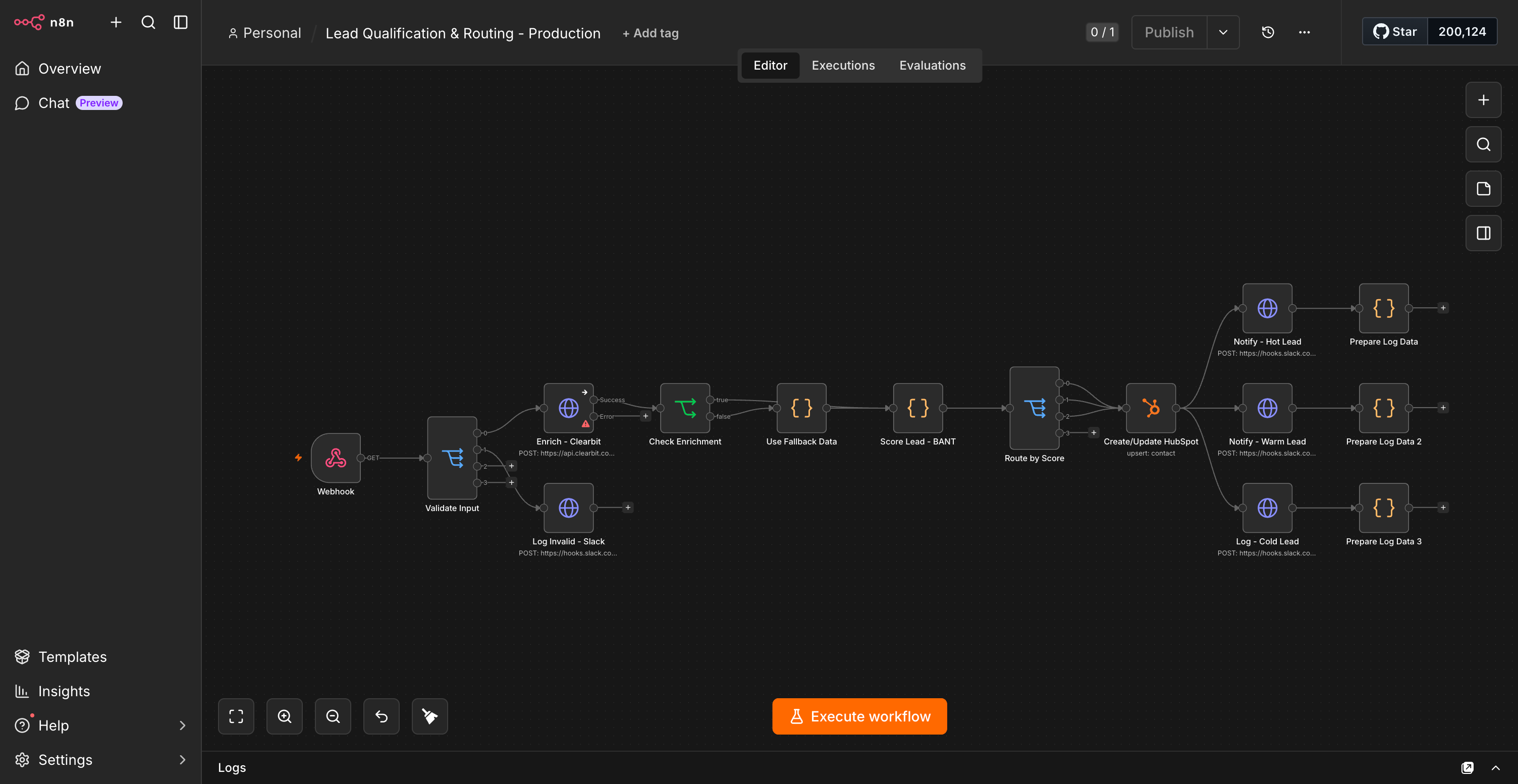
Every step has error handling. Nothing fails silently.
Step 1: Input Validation (Critical)
Leads come in messy. You need to validate before you do anything:
Validation Checklist:
- Email exists AND is valid format
- First name not empty
- Company not generic ("company" or "test")
- Phone format correct (if provided)
- No obvious spam patterns
In N8N, use a Switch node to validate:
{
  "Conditions": [
    {
      "condition": "Email regex valid",
      "regex": "^[^\\s@]+@[^\\s@]+\\.[^\\s@]+$",
      "field": "email",
      "action": "continue"
    },
    {
      "condition": "Not spam domain",
      "check": "NOT (domain === 'test.com' OR domain === 'example.com')",
      "action": "continue"
    },
    {
      "condition": "First name exists",
      "check": "firstName.length > 0",
      "action": "continue"
    }
  ],
  "default": "Send to dead letter queue"
}
If validation fails, log it and stop. Don't try to fix bad data:
Invalid Lead → Log to Database → Alert admin → Don't route
Why? Because the cost of routing a bad lead (wasting sales time) is higher than logging it and reviewing later.
Step 2: Data Enrichment (With Fallback)
Enrich the lead using Clearbit, RocketReach, or similar. But always handle failure:
Try Clearbit Enrichment
  ├─ Success: Use enriched data
  ├─ Timeout: Use partial data + mark as "needs manual review"
  ├─ Rate Limited: Queue for retry + use cached data
  └─ API Error: Use fallback data + alert
In N8N:
{
  "node": "Clearbit Enrichment",
  "timeout": "10s",
  "retry": {
    "enabled": true,
    "maxAttempts": 2,
    "backoff": "exponential"
  },
  "onError": {
    "action": "use fallback",
    "fallbackData": {
      "company": "from_form_submission",
      "enriched": false,
      "reason": "API failed"
    },
    "alert": "Send to Slack"
  }
}
Key point: Enrichment should never block the entire workflow. If Clearbit is down, route the lead anyway with the data you have.
Step 3: Lead Scoring (BANT + Custom)
Score based on BANT (Budget, Authority, Need, Timeframe):
Score Calculation:
- Budget signals: +25 (mentions budget, amount)
- Authority signals: +20 (VP, Director, Manager title)
- Need signals: +20 (mentions problem we solve)
- Timeframe signals: +25 (says "this month", "urgent", "asap")
- Company size: +10 if 50-500 employees (sweet spot)
- Industry match: +15 if in target verticals

Total Score: 0-115 (normalize to 0-100)

Routing:
- 80+: Hot lead → Immediate routing + call
- 60-79: Warm lead → Route to sequence + email
- 40-59: Cool lead → Nurture queue
- <40: Cold lead → Archive
{
  "scoringRules": {
    "budget_mention": {
      "weight": 25,
      "keywords": ["budget", "budget of", "spend", "investment"]
    },
    "authority": {
      "weight": 20,
      "titles": ["VP", "Director", "Manager", "Chief"]
    },
    "need": {
      "weight": 20,
      "keywords": ["need", "pain", "problem", "challenge", "struggling"]
    },
    "urgency": {
      "weight": 25,
      "keywords": ["this month", "asap", "urgent", "immediately"]
    },
    "company_size": {
      "weight": 10,
      "min": 50,
      "max": 500
    }
  }
}
Step 4: Routing Logic (No Collisions)
This is where most automations break. You need to prevent:
- Same lead assigned to multiple reps
- Lead assigned to rep who's at capacity
- Lead assigned to rep outside their territory
In N8N:
BEFORE routing:
1. Check if lead already in CRM
   - If yes → Update, don't re-route
   - If no → Proceed

2. Get available reps for this territory
   - Territory match: ✓
   - Current load < capacity: ✓
   - Not on vacation: ✓

3. Assign to rep with lowest current workload

4. Lock assignment in database (atomic)
   - Prevents race condition if two workflows process same lead

5. If no available reps: Send to queue with auto-retry
Database lock pseudocode:
{
  "node": "Lock Assignment",
  "query": "UPDATE leads SET assigned_rep = ?, locked = 1 WHERE id = ? AND locked = 0",
  "timeout": "30s",
  "onConflict": "requeue with exponential backoff"
}
This prevents the same lead being assigned to two people.
Step 5: CRM Creation (Idempotent)
If the workflow fails AFTER routing but BEFORE CRM creation, you don't want to create duplicates.
Make this idempotent:
Create CRM Lead:
1. Check: Does this email already exist in CRM?
   - If yes: Skip creation, update instead
   - If no: Create new

2. Set external_id = form_submission_id
   - If we re-run this workflow, use external_id to find existing record
In N8N:
{
  "node": "HubSpot Create/Update",
  "method": "upsert",
  "lookupField": "hs_lead_id",
  "data": {
    "hs_lead_id": "form_123456",
    "firstname": "John",
    "email": "john@example.com",
    "hs_lead_status": "new",
    "hs_lead_score": 85
  }
}
If the workflow crashes here, you can safely re-run it. The upsert will find the existing record and update it.
Step 6: Monitoring & Alerts (Critical)
Your workflow needs to scream when something goes wrong:
Alerts:
1. Workflow fails → Slack alert to ops
2. Too many invalid leads → Alert to marketing
3. Routing queue building up → Increase concurrency
4. API rate limits hit → Pause and retry

Dashboard (daily report):
- Leads processed: 87
- Valid: 82 (94%)
- Enriched: 79 (96%)
- Routed to CRM: 79
- Hot leads: 12
- Warm leads: 31
- Cold leads: 36
In N8N, use error workflows:
Main Workflow Fails
        ↓
Trigger Error Workflow
        ├─ Log to database
        ├─ Send Slack alert
        ├─ Pause main workflow
        └─ Alert ops to investigate
Also log everything:
{
  "node": "Log Execution",
  "data": {
    "timestamp": "ISO8601",
    "lead_id": "form_123",
    "email": "john@example.com",
    "status": "routed",
    "score": 85,
    "assigned_to": "rep_john",
    "time_ms": 2340,
    "errors": []
  },
  "destination": "database"
}
At end of day, query this log:
SELECT
  COUNT(*) as total_processed,
  COUNT(CASE WHEN status='routed' THEN 1 END) as routed,
  COUNT(CASE WHEN status='invalid' THEN 1 END) as invalid,
  COUNT(CASE WHEN errors IS NOT NULL THEN 1 END) as failed,
  AVG(time_ms) as avg_latency
FROM workflow_logs
WHERE DATE(timestamp) = CURRENT_DATE
  AND workflow = 'lead_qualification'
Step 7: Queue Mode (Non-Negotiable at Scale)
Once you get past 20-30 simultaneous leads, turn on Queue Mode:
Without Queue Mode:
- Max 5 concurrent executions
- Lead 6 waits while lead 5 finishes
- High latency, high failure risk

With Queue Mode:
- Unlimited concurrent executions
- Every lead processes independently
- PostgreSQL backend ensures no loss
- Retry automatically on failure
Config:
{
  "execution": "queue",
  "db": "postgres",
  "backup": {
    "daily": true,
    "restore_test": "monthly"
  }
}
Real Production Checklist
Before you activate this workflow on real leads:
- Input validation — Rejects bad data without crashing
- Error handling — Every API call has retry + fallback
- Idempotent operations — Can safely re-run without duplicates
- Logging — Every step logged for audit trail
- Monitoring — Alerts on failures, stuck queues
- Routing logic — No duplicate assignments, respects capacity
- Queue mode — Enabled if >20 concurrent executions expected
- Database backups — Daily with monthly restore tests
- Rate limiting — Respects API limits with backoff
- Fallbacks — If enrichment fails, continue anyway
- Testing — Tested with 10x expected volume
- Runbook — Clear steps if something breaks
Common Failure Modes (Real Issues)
Problem 1: Silent API Failures
Your enrichment API times out. Workflow continues with incomplete data. Lead routed with missing company info. Sales rep confused.
Prevention:
If enrichment takes > 10s: Use fallback data + log + alert
Don't wait hoping it comes back
Problem 2: Duplicate Routing
Two concurrent workflows process the same lead (unlikely but happens). Lead assigned to two reps simultaneously.
Prevention:
Lock the database row before routing
UPDATE leads SET locked=1 WHERE id=? AND locked=0
Only one workflow can claim it
Problem 3: Queue Builds Up
50 leads come in at once. Queue shows 87 pending. Oldest is 45 minutes old. Sales not getting leads on time.
Prevention:
Monitor queue depth
If queue > 100, alert ops
Increase concurrency or add N8N nodes
Problem 4: Bad Data Crashes Scoring
Lead has "???!" as company name. Scoring logic fails. Workflow stops.
Prevention:
Validate data BEFORE scoring
Reject invalid data early
Don't try to salvage garbage data
Real Numbers
Production workflow handling 100 leads/day:
Before automation (manual):
- 3 hours per day (human time)
- 5-7% lost leads (miss some emails)
- Inconsistent routing (depends on person)
After MVP automation (no error handling):
- 0 human time
- 2% lost leads (silent failures)
- Consistent routing
After production automation (this setup):
- 0 human time
- 0% lost leads (all logged and retried)
- Consistent, capacity-aware routing
- 100% audit trail
- <200ms per lead (including enrichment)
Cost impact: 3 hours × $50/hr = $150/day = $3,000/month saved. That's what pays for the time to build this right.
The Real Talk
Most N8N automation fails because teams treat workflows like scripts. "Set it and forget it" works until it doesn't.
Real production automation is:
- Boring (no failures means it's working)
- Defensive (assumes things will break)
- Observable (you know what happened)
- Recoverable (errors don't cascade)
- Testable (you can verify it works)
You don't need complex workflows. You need boring workflows with good error handling. That's production.
What breaks your N8N workflows in production? Data quality? Routing conflicts? Silent failures? Share what you've learned — production automation is all about learning from failure.