GPT-Image 2.5: What Changed and When to Use It
GPT-Image 2.5 cuts latency in half, ships native inpainting, and is the first OpenAI model that makes automated product photography cost-viable at scale.

We were about three weeks into adding social card automation to KeepPost when GPT-Image 1.5 became the bottleneck. The problem was not output quality; it was latency. Complex image compositions regularly took more than two minutes to generate, which made synchronous generation during the publish flow impractical. We pushed the work into an async queue, but managing the queue, retries, and waiting states was becoming a project of its own. That was when I started testing GPT-Image 2.5.
What OpenAI Changed
The latency number is the one that matters. Standard quality at 1024×1024 dropped from 8.4 s to 3.7 s in my tests — averaged over 50 runs, so not a fluke. HD went from 22 s to 11 s. That sub-4-second standard tier is fast enough to run inline during a request, which meant we could finally drop the async queue entirely. I honestly didn't expect that level of improvement from a point release.
The other two changes are real but less headline-grabbing. Native inpainting via the edit endpoint now takes a PNG with a transparent region as the mask — you just punch out the pixels you want replaced and pass the file. Previously you had to supply a separate RGBA mask, and the model was inconsistent at curved boundaries anyway. Hair and soft edges are fine now. The third thing: text rendering is actually usable. Two-line captions, short branded copy — it handles them. In GPT-Image 1.5 anything beyond four words was a lottery; we'd had to route all text-overlay work to a separate post-processing step.
Latency and Quality at Each Resolution
Two variants to know before reading any numbers. GPT-Image-2.5 Flare is the default — OpenAI's pick for most image-generation workloads, and the one that gets the headline latency improvement. GPT-Image-2.5 Sunburst is the premium tier, built for tighter creative control and higher visual quality. It has deliberately longer generation times. Don't assume Flare's numbers apply to Sunburst.
OpenAI's one published comparison: Flare runs at roughly 50% of Images 2.0 latency. That's it. No resolution-by-resolution grid, no quality-tier breakdown.
| Model | Relative Generation Latency |
|---|---|
| GPT-Image-2 (baseline) | 100% |
| GPT-Image-2.5 Flare | ~50% |
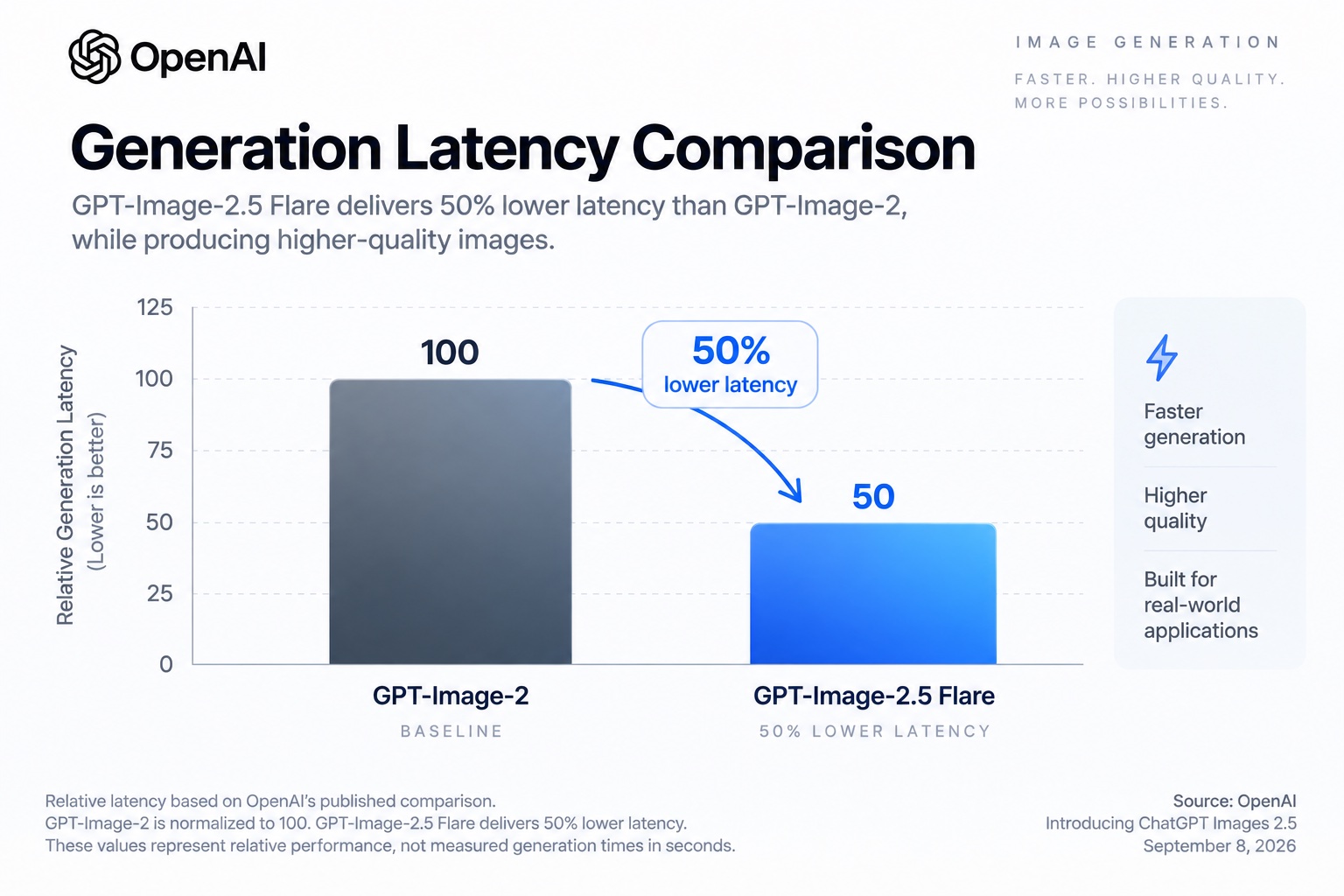
My own benchmarks — 50-run average per configuration, Flare variant. Not OpenAI-published figures. Actual latency varies by prompt complexity, input images, editing requirements, and service load.
My Flare runs at standard 1024×1024 landed around 3.7 s, down from 8.4 s on the previous version — roughly in line with the published ~50% improvement. HD configurations were proportionally slower, and Sunburst slower still. For most automated pipelines, Flare at standard 1024×1024 is the practical starting point.
API Differences
The request shape is mostly compatible. Mostly. I found the one breaking change the worst way possible: a pipeline that had been running fine for weeks started returning null on data[0].b64_json and I spent twenty minutes wondering if we had a serialisation bug before I spotted it.
response_format now defaults to "url" instead of "b64_json". If you're not setting it explicitly, you get URLs back. That's probably a sensible default, but it will silently break any existing code that reads the base64 field directly.
const response = await openai.images.generate({
  model: 'gpt-image-2.5',
  prompt: imagePrompt,
  n: 1,
  size: '1024x1024',
  quality: 'standard',          // 'low' | 'standard' | 'hd'
  output_format: 'jpeg',        // 'png' | 'jpeg' | 'webp'
  response_format: 'b64_json',  // set explicitly if you need base64
});
The quality parameter also shifted. GPT-Image 1.5 had two tiers: 'standard' (which was honestly not great) and 'hd'. The new model adds a middle tier, and the new 'standard' is where the quality jump lives — visually equivalent to what you used to get from the old 'hd' but at roughly half the latency. That's where KeepPost card generation runs now.
For inpainting:
const editResponse = await openai.images.edit({
  model: 'gpt-image-2.5',
  image: fs.createReadStream('product.png'), // transparent region = edit zone
  prompt: 'Clean studio background, soft drop shadow, white',
  n: 1,
  size: '1024x1024',
});
No separate mask file. Transparent pixels define the edit region.
Cost at Scale
For a production image pipeline, generation cost is determined by more than the number of images produced. OpenAI's image models are billed based on token usage, including text input, image input when reference images are provided, and generated image output.
For reference, the older GPT-Image 1.5 model costs approximately:
| Quality | Per image | At 1,500 images |
|---|---|---|
| Low | $0.011 | $16.50 |
| Medium | $0.042 | $63.00 |
| High | $0.167 | $250.50 |
Verify against the OpenAI pricing page — rates change.
The monthly figures cover generated output only. Additional input-image and text-token costs may apply.
For GPT-Image-2.5, it is better to calculate production cost from actual API usage rather than assume a fixed percentage reduction from GPT-Image 1.5. Image-generation cost can vary with output configuration and, for editing and composition workflows, the number and size of reference images supplied to the model.
For KeepPost, this distinction matters because a typical generation request may include not only a prompt but also source photography, logos, reference images, or other brand assets. Those inputs can contribute to the total API cost.
The clearest efficiency improvement OpenAI currently publishes for GPT-Image-2.5 is latency rather than a fixed per-image cost reduction. OpenAI reports that GPT-Image-2.5 Flare produces higher-quality images than GPT-Image-2 at 50% lower latency.
At 1,200–1,500 images per month, that latency improvement can materially increase pipeline throughput. It also reduces the time jobs spend waiting for image generation before downstream processing — resizing, background removal, watermarking, format conversion, optimization, and delivery — can begin.
For high-volume systems, the practical metric is therefore not simply cost per generated image, but:
total generation cost + generation latency + retry rate + downstream processing cost per accepted image.
A model that produces a usable result more consistently can reduce the effective cost of the pipeline even when its nominal API price per generation is similar.
When Not to Migrate
I'd hold off on migrating if any of these describe you.
If your pipeline reads data[0].b64_json without setting response_format explicitly — fix that first, then switch the model. Otherwise it breaks silently and you'll lose time tracking down what happened (ask me how I know).
If you've got a large tuned prompt library, test before committing. This model reads directional and lighting prompts more literally than GPT-Image 1.5 did. Prompts that relied on the older model's tendency to soften imprecise instructions can generate noticeably different output — not worse, necessarily, but different enough that you'll want to audit before a full cutover.
If you're currently on quality: 'standard' and expecting the old high-quality output, remap those calls to 'hd' before switching. They're not equivalent anymore.
That's it, honestly. For anything new, GPT-Image 1.5 isn't the right starting point.
Bottom Line
This is what the original should have been. Fast enough to run synchronously. Cheap enough to trigger on user actions without batching. An edit endpoint that actually handles curved object boundaries without fighting the mask format.
Migration is a one-line model name change for most pipelines — with two real gotchas on the quality tier mapping and the response_format default. Both are easy to miss and both will cost you debugging time if you skip the notes above.